
Product updates
The biggest updates across the CIVIE platform, newest first. Follow CIVIE on LinkedIn for smaller improvements as they ship.
- CIVIE Voice
Billing voice agent: secure pay links, every account, more requests
CIVIE VoiceWhat’s new
- Pay by link, never by card. The agent texts the caller a secure pay link that needs no login. It never takes a card number over the phone.
- Every account, totaled. For patients with more than one account, the agent finds them all and gives one combined balance.
- More requests handled. Callers can add workers’ comp, auto or lien insurance, request a refund or ask for an eligibility check.
- Check payments. The agent reads the mailing address from the caller’s own statement and can text it on request.
Other improvements
- The agent always verifies the caller’s identity before discussing anything on the account.
- Platform & Security
Multi-factor authentication for every password sign-in
Trust Center- MFA at account setup. Anyone who signs in to CIVIE with a password sets up multi-factor authentication when they first create their account.
- Single sign-on unchanged. Users who sign in through their organization’s identity provider keep that provider’s MFA.
- Clearer invitations. Invitation emails now show MFA as a setup step, so new users know what to expect.
- Analytics
Executive AR and charge integrity dashboards
Analytics & InsightsWhat’s new
- Executive AR overview. A leadership view of accounts receivable, with a matching reconciliation summary.
- Charge integrity. Compare the CPT recorded for every exam with what was billed, to catch missed and mismatched charges.
- Charge capture health score. One number for how completely exams turn into charges.
Other improvements
- Physician productivity reports now account for holidays and shift rules.
- Administrators control dashboard access for each organization.
- RCM
Real-time claim status checks and payer fax setup
Claim status- Real-time claim status. Check a claim’s status with the payer straight from the claim, or check up to 25 claims at once.
- Status history. Every check is saved on the claim detail page, so the whole team sees what the payer said and when.
- Payer audit tracking. Set up and follow the audits payers request, in one place.
- Claims fax per payer. Set and verify a claims fax number for each payer in payer settings.
- Patient Communications
Text message consent tracked by purpose
Radiology Information System- Consent per purpose. Each message purpose, such as billing or appointments, has its own consent record, and text messages are only sent when consent for that purpose is on file.
- Codes and alerts still arrive. One-time sign-in codes a patient asks for, and account alerts, are delivered without a separate opt-in.
- Attachments in email. Emails sent through CIVIE can now carry attachments.
- Clearer delivery errors. Failed sends return specific error codes, so staff can see why a message didn’t go out.
- RCM
Void and refund card payments from the ledger
Revenue Cycle Management- Void or refund in one place. Same-day card sales are voided and earlier sales are refunded straight from the transaction.
- Ledger stays in step. The ledger entry is written only after the payment gateway approves the void or refund.
- Gateway settings. Each organization’s payment gateway connection is managed in integration settings.
- Overpayments and refund approvals. Payments on the patient account handle overpayment credits and route refunds for approval.
- EasyPay
Redesigned EasyPay: shareable bills and a payment timeline
What’s new
- Share a bill. Patients can share a bill with a family member or whoever pays it.
- Payment timeline. Every payment on the bill, in order, in one place.
- Redesigned statements and receipts. Clearer layout for what’s owed and what’s been paid.
Other improvements
- A refreshed EasyPay workspace with new navigation.
- Practice contact details can be set for each network, so patients always see the right number.
 EasyPay
- Platform & Security
In-app documentation and Ask CIVIE
- Guides inside the product. Documentation for RCM, RIS, analytics and onboarding is available from inside each application.
- Ask CIVIE. Ask a how-to question in plain language and get an answer drawn from those guides.
- RCM
AI assistants for coding, facesheets and EOBs
Radiology codingWhat’s new
- Coding copilot. Suggests codes in the coding workspace and learns from coders’ corrections. It proposes; coders decide.
- Facesheet review. Shows extraction progress, compares patient and payer matches and suggests field values with the source text beside them.
- EOB assistant. Explains a remittance with citations to the document and prepares draft postings for review.
Other improvements
- An AI assistant sidebar is available across RCM modules.
- AI Agents
Build, publish and monitor voice agents and automation bots
AI AgentsVoice agents
- Start from a template. Create an agent from a template or a prebuilt agent, edit it and publish it.
- Test in the browser before assigning the agent a phone number.
- Conversations captured automatically. Each call’s transcript and results are saved after the call.
Automation bots
- Live monitoring of every run, with run analytics.
- Optional AI recovery when a portal changes, set per run.
- Configurable delivery of results, with duplicate-send protection and delivery history.
- RCM
Automatic ERA posting and payer remit retrieval
Revenue Cycle Management- ERA auto-posting. 835 remittances arrive electronically and post automatically.
- Exception queue. Remits that need a person go to a redesigned exception queue and posting workspace.
- Remits from payer portals. Remittances are retrieved from payer portals automatically for bank reconciliation.
- EasyPay
EasyPay in Spanish, whole-account Quick Pay and 0% plans
EasyPay- English and Spanish. Patients can switch the bill-pay pages between English and Spanish.
- Whole-account Quick Pay. Quick Pay shows everything a patient owes, whether they arrive from a phone number or a unique pay link.
- 0% payment plans. Practices can offer payment plans at 0% interest.
- Safer guest sessions. Guest bill-pay sessions time out when left idle.
- RIS
MQSA follow-up, record requests and an authorization worklist
Breast imagingWhat’s new
- MQSA follow-up. Track every follow-up end to end, run annual follow-up campaigns and report on them.
- Medical record requests. A module for receiving and fulfilling record requests.
- Authorization worklist. Work authorizations from one list, with rules for which exams need them.
Other improvements
- Self-referral orders for eligible exams.
- Patient flags and patient merge.
- RIS
AI document intake, plain-language worklist search and PDF to DICOM
Order intakeWhat’s new
- AI document intake. Incoming documents are read by CIVIE AI and matched to the right patient and insurance.
- Plain-language search. Search the worklist the way you’d ask a colleague.
- Best-slot recommendations. The schedule suggests the best available slots for each exam.
Other improvements
- Check-in runs as a step-by-step side panel.
- PDFs are converted to DICOM and sent to PACS with the study.
- EasyPay
EasyPay AI Billing Assistant
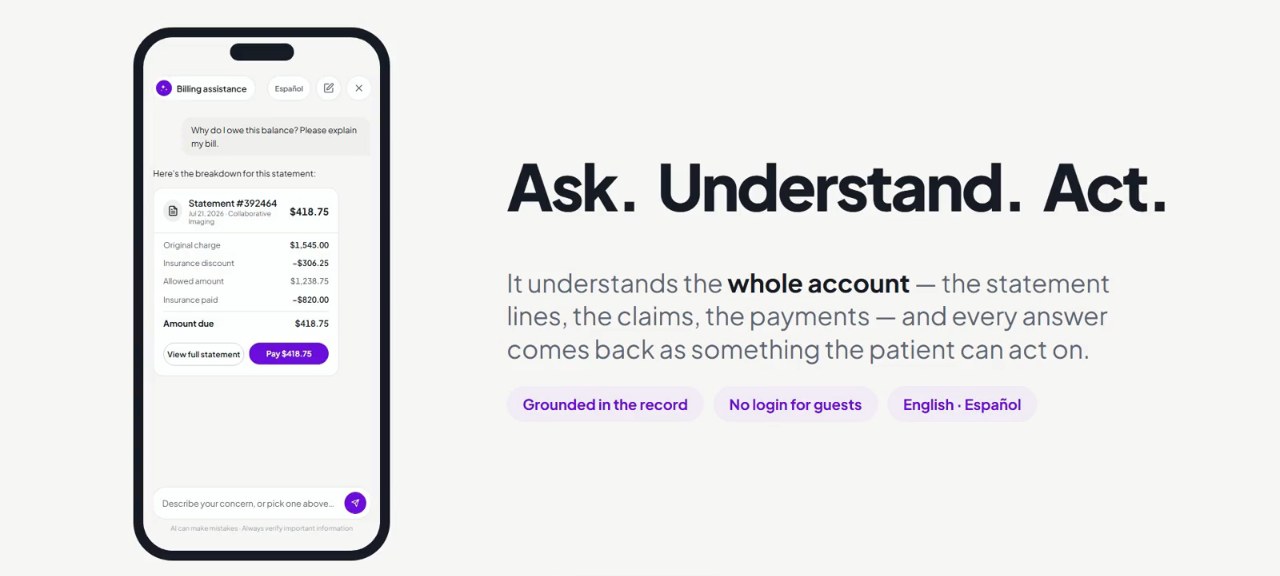
- Statement questions answered. The assistant explains what a patient owes and why.
- Refunds and options. Patients can request a refund or ask about hardship and discount options.
- EOB reconciliation. Patients can upload an explanation of benefits and the assistant reconciles it against their bill.
- Live eligibility checks. The assistant can check insurance eligibility during the conversation.
 EasyPay
Next steps
See CIVIE
in action.
Tell us about your practice and we'll show you CIVIE running on your own workflows.